Skip to content
    RResponsiveMe
    Features
    AI AssistantContext-aware drafting and guardrails
    Automation StudioScheduled, triggered workflows
    Excel StudioA real spreadsheet, AI-assisted
    BI StudioDashboards that explain themselves
    IntegrationsSlack, webhooks, and the API
    Solutions
    Workspaces & ProjectsEverything for a project, in one place
    AnalyticsUsage and performance, tracked live
    CollaborationShared context, not scattered chats
    SecurityRow-level security by default
    By use caseSee how teams use ResponsiveMe

    By industry

    Field Services & Operations
    Engineering & Consulting Firms

    By workflow

    Automated Reporting
    Communication at Scale
    Resources
    How it works
    Tools
    Templates
    FAQ
    Documentation
    Pricing
    Log inGet started
    Menu
    Get started

    Features

    AI AssistantAutomation StudioExcel StudioBI StudioIntegrations

    Solutions

    Workspaces & ProjectsAnalyticsCollaborationSecurityBy use case

    By industry

    Field Services & OperationsEngineering & Consulting Firms

    By workflow

    Automated ReportingCommunication at Scale

    Resources

    How it worksToolsTemplatesFAQDocumentation
    PricingDashboardLog in
    EXCEL STUDIO

    Excel Studio: a real spreadsheet, with an AI assistant built in.

    Excel Studio is a genuine multi-sheet workbook editor — grid, formula bar, formatting, filters, and sorting — plus an AI assistant that explains, corrects, and writes formulas for you.

    Start free Talk to us

    Workbook — Q3 Forecast.xlsx

    Active sheet

    Revenue by region

    Formula bar

    =SUM(B2:B14)

    AI assistant

    Formula explainedExample

    THE PROBLEM

    Spreadsheet errors are expensive and hard to catch.

    A broken formula, a wrong reference, or a filter left applied can silently produce the wrong number in a report — and most spreadsheet tools offer no help figuring out why.

    THE RESPONSIVEME APPROACH

    Formula help that explains itself, in the grid.

    Ask the AI assistant to explain what a formula does, fix an error, or generate a new formula from a plain-language description. Every suggestion is shown before it's applied, and full version history means you can always go back.

    WHY IT MATTERS

    Built for teams that need it to just work.

    Multiple worksheets

    Work across a full workbook with a worksheet explorer, not a single flat grid.

    AI formula assistant

    Explain, correct, or generate formulas in plain language, with the result shown in the formula bar before you accept it.

    Real formatting controls

    Number and date formatting, conditional formatting, and cell styling — the tools you already expect from a spreadsheet.

    Sort and filter

    Filter, sort, and work with tables and named ranges directly in the grid.

    Version history

    Every save is versioned, so you can compare or restore an earlier state of a workbook.

    Built on a real spreadsheet engine

    Excel Studio is built on Univer, a mature open-source spreadsheet engine — not a custom grid reinvented from scratch.

    HOW IT WORKS
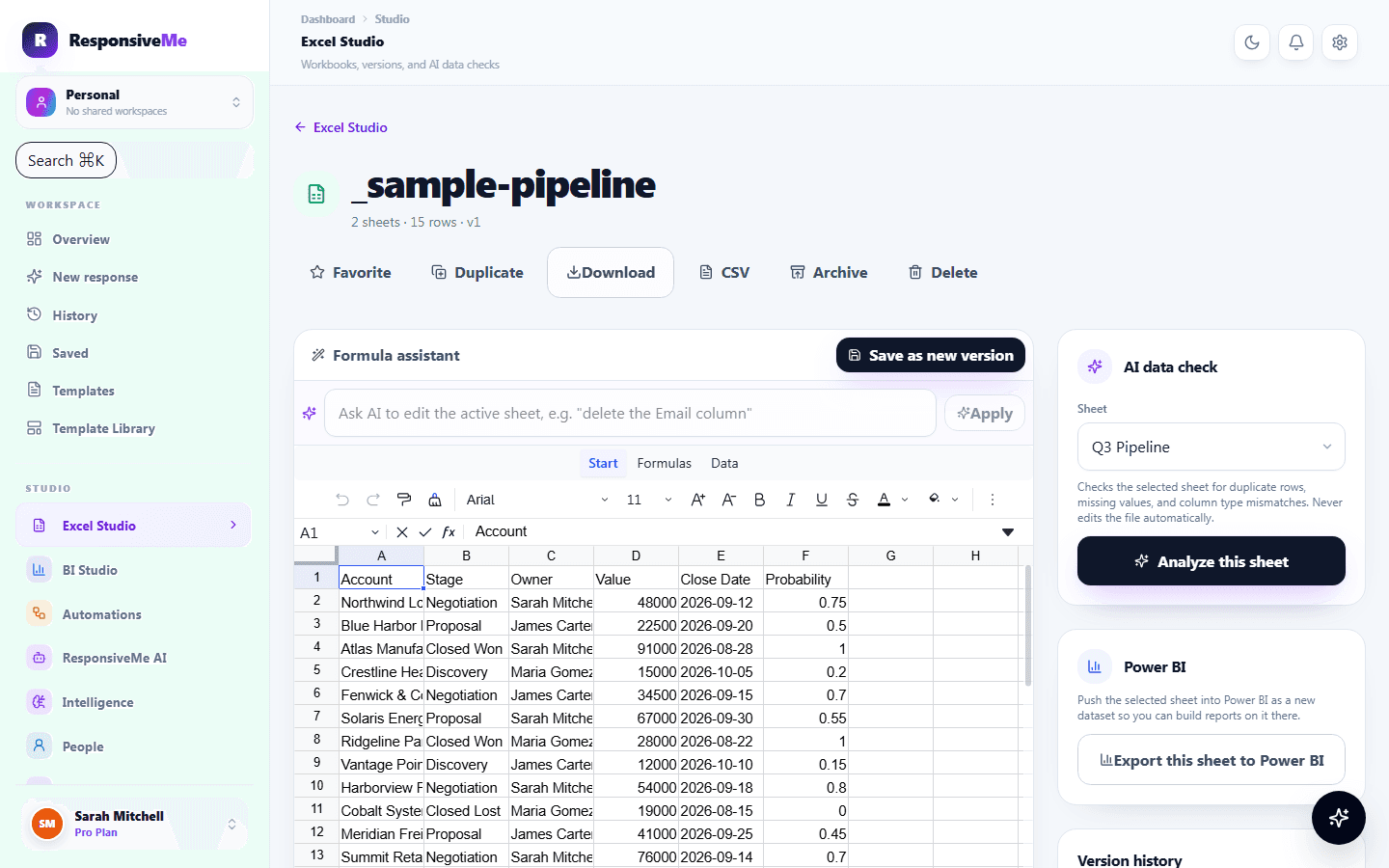
    From a broken formula to a reviewed fix.

    Open a real workbook

    Multiple worksheets, a formula bar, filters, and sorting — a genuine spreadsheet, not a single flat grid.

    Something looks off

    A broken formula or a wrong reference can silently produce the wrong number in a report.

    Ask the AI assistant

    Explain what a formula does, fix an error, or generate a new one from a plain-language description.

    Review before it applies

    Every suggestion is shown in the formula bar first — nothing changes until you accept it.

    Versioned, always

    Every save is versioned, so you can compare or restore an earlier state of the workbook.

    Open a real workbook

    From a broken formula to a reviewed fix. — actual product interface

    Active sheet

    Revenue by region

    From a broken formula to a reviewed fix.

    From a broken formula to a reviewed fix. — actual product interface

    Open a real workbook

    Multiple worksheets, a formula bar, filters, and sorting — a genuine spreadsheet, not a single flat grid.

    Active sheet: Revenue by region

    Something looks off

    A broken formula or a wrong reference can silently produce the wrong number in a report.

    Formula bar: =SUM(B2:B14)

    Ask the AI assistant

    Explain what a formula does, fix an error, or generate a new one from a plain-language description.

    AI assistant: Explaining formula…

    Review before it applies

    Every suggestion is shown in the formula bar first — nothing changes until you accept it.

    AI assistant: Formula explained

    Versioned, always

    Every save is versioned, so you can compare or restore an earlier state of the workbook.

    Version history: Saved · v14
    Start free

    USE CASES

    Where teams put this to work.

    Financial models

    Build and maintain a forecast or budget with formulas you can ask the AI to double-check.

    Data cleanup

    Filter, sort, and reformat imported data before it feeds into a BI Studio dataset or report.

    Shared workbooks

    Keep a working spreadsheet inside your workspace instead of emailing versions back and forth.

    Related:

    Try the free Excel Formula Generator →Try the free CSV Analyzer →

    Open a workbook and try it.

    Create your first spreadsheet in Excel Studio — free to start.

    Start free View plans
    RResponsiveMe

    Turn scattered spreadsheets and project data into a client-ready report — built for consulting and professional services teams tired of rebuilding the same update by hand.

    alhartheiyasir@gmail.com

    Platform

    AI AssistantAutomation StudioExcel StudioBI StudioIntegrations

    Solutions

    Workspaces & ProjectsAnalyticsCollaborationSecurity

    Workflows & Industries

    Automated reportingCommunication at scaleEngineering & consultingField services & operations

    Resources

    ToolsTemplatesHow it worksUse casesHelp CenterFAQDocumentationAboutContact

    Account

    PricingDashboardSign inBillingSettings

    © 2026 ResponsiveMe. All rights reserved.

    PrivacyTermsCookiesAcceptable UseDPARefundsStatus