Skip to content
    RResponsiveMe
    Features
    AI AssistantContext-aware drafting and guardrails
    Automation StudioScheduled, triggered workflows
    Excel StudioA real spreadsheet, AI-assisted
    BI StudioDashboards that explain themselves
    IntegrationsSlack, webhooks, and the API
    Solutions
    Workspaces & ProjectsEverything for a project, in one place
    AnalyticsUsage and performance, tracked live
    CollaborationShared context, not scattered chats
    SecurityRow-level security by default
    By use caseSee how teams use ResponsiveMe

    By industry

    Field Services & Operations
    Engineering & Consulting Firms

    By workflow

    Automated Reporting
    Communication at Scale
    Resources
    How it works
    Tools
    Templates
    FAQ
    Documentation
    Pricing
    Log inGet started
    Menu
    Get started

    Features

    AI AssistantAutomation StudioExcel StudioBI StudioIntegrations

    Solutions

    Workspaces & ProjectsAnalyticsCollaborationSecurityBy use case

    By industry

    Field Services & OperationsEngineering & Consulting Firms

    By workflow

    Automated ReportingCommunication at Scale

    Resources

    How it worksToolsTemplatesFAQDocumentation
    PricingDashboardLog in
    AUTOMATION STUDIO

    Repeatable responses, running on their own.

    Automation Studio turns a one-off AI response into a reliable workflow: pick a trigger, add steps, and let it run — with full visibility into every execution.

    Start free Talk to us

    Automation hub

    Trigger

    Weekly · Monday 09:00

    Delivery

    Slack #client-updates

    Last 30 days

    Success rate trackedExample

    THE PROBLEM

    The same message, written from scratch, every time.

    Weekly status updates, payment reminders, and follow-up emails are predictable — yet most teams still write them manually, with no record of what went out, when, or whether it worked.

    THE RESPONSIVEME APPROACH

    A visual workflow builder, not a script to maintain.

    Choose a manual, scheduled, or API trigger, add an AI drafting step with a fixed tone and context, then deliver the result to Slack, a webhook, or a saved workspace — with automatic retries and incident alerts if something fails.

    WHY IT MATTERS

    Built for teams that need it to just work.

    Three trigger types

    Run workflows manually, on a recurring schedule, or on demand through an API call from another system.

    Configurable retries

    Set a retry policy per workflow so transient failures don't require manual intervention.

    Automatic incidents

    A failed run creates a tracked incident with severity and error detail — acknowledge and resolve it from one place.

    Full execution history

    Every run is logged with duration, outcome, and step-by-step results, going back 30 days by default.

    Auto-pause on repeated failure

    Workflows can pause themselves after a configurable number of consecutive failures, so nobody gets paged for nothing.

    Templates to start from

    Client follow-up, weekly status update, and payment reminder templates get you to a working workflow in minutes.

    HOW IT WORKS
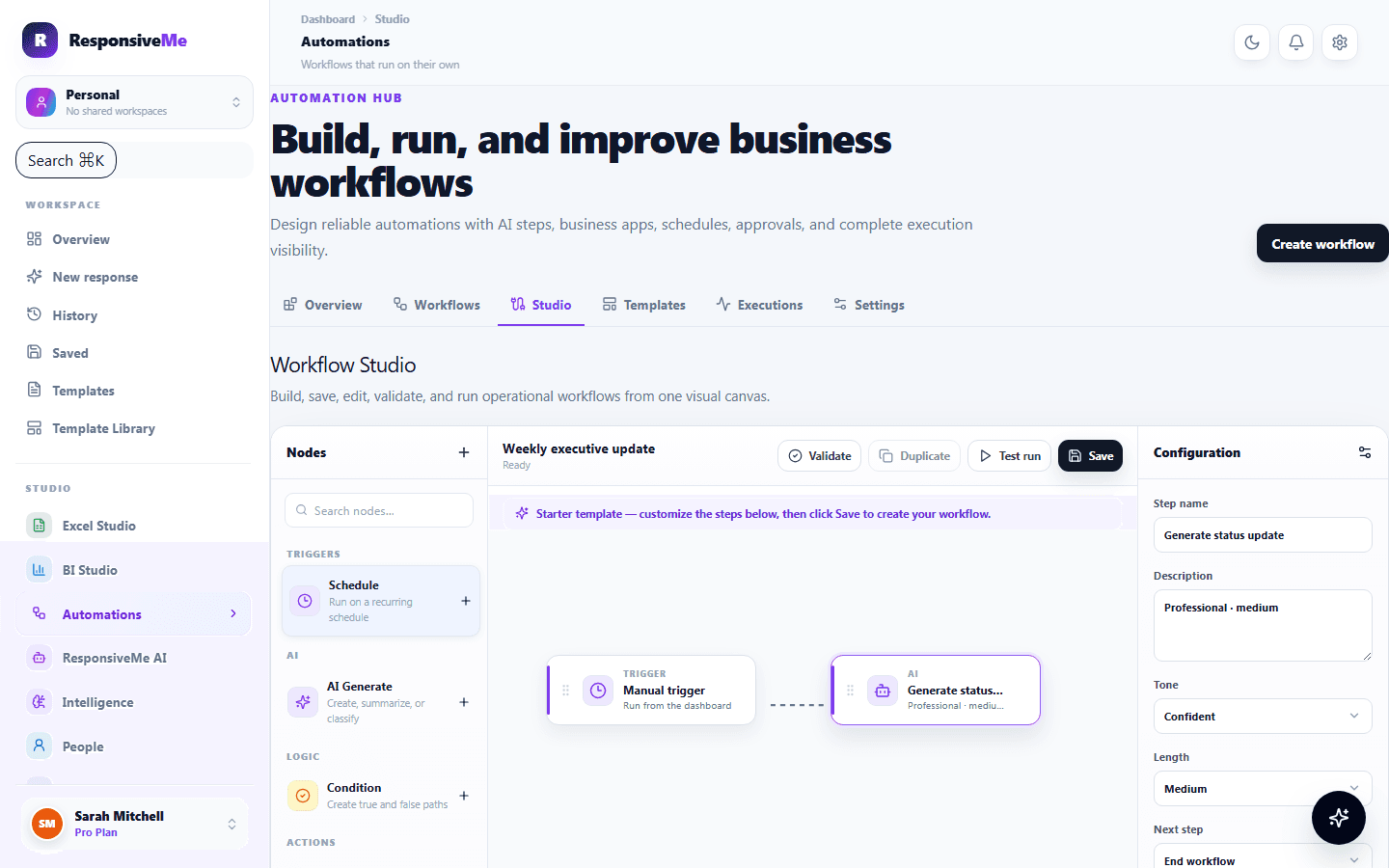
    From a trigger to a finished delivery.

    Pick a trigger

    Manual, a recurring schedule, or an API call from another system.

    Add an AI step

    Draft with a fixed tone and real context — summarize, analyze, extract, or classify.

    It runs on its own

    No one has to remember — it executes on schedule, on demand, or when triggered externally.

    Delivered automatically

    To Slack, a webhook, or a saved workspace — wherever the result needs to land.

    Tracked, retried, resolved

    A failed run retries automatically, or becomes a tracked incident with severity and detail.

    Pick a trigger

    From a trigger to a finished delivery. — actual product interface

    Trigger

    Weekly · Monday 09:00

    From a trigger to a finished delivery.

    From a trigger to a finished delivery. — actual product interface

    Pick a trigger

    Manual, a recurring schedule, or an API call from another system.

    Trigger: Weekly · Monday 09:00

    Add an AI step

    Draft with a fixed tone and real context — summarize, analyze, extract, or classify.

    AI step: Drafting…

    It runs on its own

    No one has to remember — it executes on schedule, on demand, or when triggered externally.

    Status: Running

    Delivered automatically

    To Slack, a webhook, or a saved workspace — wherever the result needs to land.

    Delivery: Slack #client-updates

    Tracked, retried, resolved

    A failed run retries automatically, or becomes a tracked incident with severity and detail.

    Last 30 days: Success rate tracked
    Start free

    USE CASES

    Where teams put this to work.

    Client follow-ups

    Automatically draft and send a check-in message on a schedule, without anyone remembering to do it.

    Status reporting

    Generate a weekly status update from your data and deliver it straight to a Slack channel.

    Payment reminders

    Trigger a professionally worded reminder a set number of days before or after a due date.

    Related:

    See a full automated-reporting workflow →

    Build your first automation.

    Start from a template or a blank workflow — no code required.

    Start free View plans
    RResponsiveMe

    Turn scattered spreadsheets and project data into a client-ready report — built for consulting and professional services teams tired of rebuilding the same update by hand.

    alhartheiyasir@gmail.com

    Platform

    AI AssistantAutomation StudioExcel StudioBI StudioIntegrations

    Solutions

    Workspaces & ProjectsAnalyticsCollaborationSecurity

    Workflows & Industries

    Automated reportingCommunication at scaleEngineering & consultingField services & operations

    Resources

    ToolsTemplatesHow it worksUse casesHelp CenterFAQDocumentationAboutContact

    Account

    PricingDashboardSign inBillingSettings

    © 2026 ResponsiveMe. All rights reserved.

    PrivacyTermsCookiesAcceptable UseDPARefundsStatus